

Mobius (Web-based Math Assessment)
Mobius is an industry-leading application used by Confederation College for teaching and assessing math courses at the College. Mobius is also web-based and can therefore be accessed from any Internet-connected computer.
How to Access Mobius for your College Math Course
1. Mobius can be accessed by logging into the College’s MyCampus Portal application by typing in the URL: http://www.confederationcollege.ca into your web browser (this is the College’s main website).
2. At the top of the College website main page, click the link My Campus Portal.
3. At the MyCampus Portal login page, please enter your College username and password and then click the ‘Login’ button.
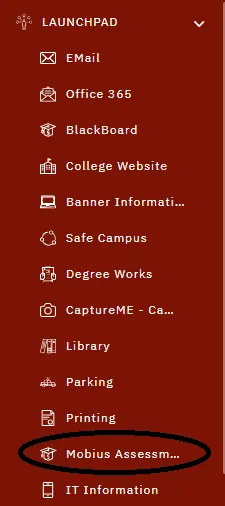
4. Once you are logged into the MyCampus Portal, on the left-hand side of the page under the LaunchPad section you will see the ‘Mobius Assessment’ link. Click on this icon to be automatically logged into Mobius.
5. You will then be brought to the Mobius login page. Use your College account username and password to login. Once in Mobius you’ll be able to see your math courses you are enrolled in.