
Blackboard
Blackboard is Confederation College’s primary LMS (Learning Management System). It is very widely used online learning platform that the college uses to deliver, manage, and track courses and learning activities.
What Blackboard Is Used For?
Blackboard acts as a central hub for teaching and learning, allowing faculty and students to interact digitally.
For instructors
- Upload course materials (PDFs, slides, videos, links)
- Create assignments, quizzes, and exams
- Grade student work and provide feedback
- Communicate via announcements, discussion boards, and messaging
- Track student participation and performance
For students
- Access course content anytime
- Submit assignments online
- Take quizzes and exams
- View grades and instructor feedback
- Participate in discussions and group work
How to Access Blackboard
There are two ways to access the Blackboard system:
- From a web browser – see section below ‘How to Login to Blackboard’
- Using the mobile app. Blackboard has a mobile app for use on both iOS and Android devices. You may download the app by visiting the applicable app store. Once downloaded you will need to pick ‘Confederation College’ as your school and then login using your regular College account username & password.
How to Login to Blackboard (Web-browser)
- Blackboard is a web-based application and can be accessed through any Internet connected computer. Login to the College’s MyCampus Portal application by typing in the URL: http://www.confederationcollege.ca into your web browser (this is the College’s main website).
- At the top of the College website main page, click the link My Campus Portal.
- At the MyCampus Portal login page, please enter your College username and password and then click the ‘Login’ button.
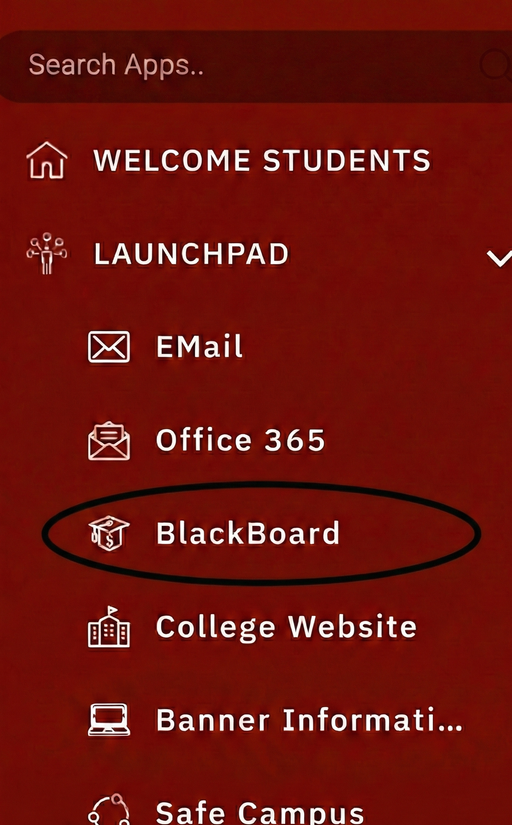
- Once you are logged into the MyCampus Portal, on the left-hand side of the page under the LaunchPad section you will see the ‘Blackboard’ link. Click on this icon to be automatically logged into Blackboard.
Using Blackboard
Blackboard offers a Blackboard Learn Help for Students website. This site is full of helpful documentation, FAQ's, how-to videos, and other resources to assist students in learning to use Blackboard Ultra.