Printing
Student printing at the College uses a pay-for-print system (PaperCut).Each student is automatically given an allocation of $36 dollars per academic year for printing purposes. This ‘print credit’ is tied to your College account and will allow you to print to any student network printer in a computer lab area. The cost for printing is as follows:
- Black & White = $0.05 cents per/page
- Black & White (double-sided print) = $0.04 cents/page
- Colour (single or double-sided print) = $0.40 cents/page
Printing costs are automatically deducted from a students’ available print balance each time a print job is sent. When you are out of print balance, students must purchase additional print credit at their own expense.
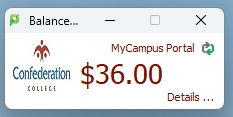
When logged into a on-campus College lab computer, you can view your print credit by viewing the PaperCut desktop pop-up (usually located in top right corner of your screen):
Student PaperCut Printing Features
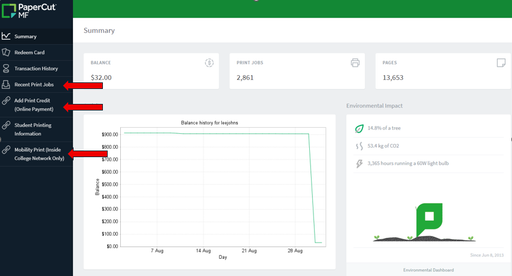
Using the pop-up PaperCut client, students have access to various printing features such as:
- Online purchasing of additional print credit
- Online history of your printing activity
- Web printing (ability to print to College printers using any device with a web browser)
All of these features can be accessed by clicking on the ‘Details…’ link at the bottom right corner of the PaperCut pop-up client.
You can also access your PaperCut printing account by logging into the College MyCampus Portal, by clicking on that link from the top menu of the main College website. Once logged into the MyCampus Portal, at the top of the page in the menu bar, click the ‘Student LaunchPad’ or ‘Employee LaunchPad’ link, and from there select the ‘Printing’ link.
Printing from Your Mobile Device
Student printers in major lab areas (Shuniah 3rd floor Help Desk(opens in new window), 1st Floor Library(opens in new window), McIntyre Help Desk(opens in new window), and ACE 2nd floor lab(opens in new window)) have been configured to allow students to print from your own laptop or mobile device - this is called Mobile Printing.
Mobile Printing is a feature that simplifies printing for students and staff who are using their personal devices (such as laptops, smartphones, tablets, and Chromebooks).Mobile Printing supports most major operating systems (Windows, Mac, iOS, Android, and Chrome) and can be setup on personal devices in a few easy steps.
To setup Mobile Printing, you’ll need to download the Mobile Printing application(opens in new window) and follow the on-screen instructions to set it up on your personal device.
Mobile Printing is only available inside the College network when connecting to ‘Confed-Secure’ wireless network.Mobile Printing is not available using the ‘Confed-Guest’ network.
Purchasing Additional Print Credit
If you run of out print credit, you’ll need to purchase more to continue to print.There are 3 main options for purchasing additional print credit for your account:
- Online payment from your College PaperCut pop-up client.
- In person at the Print Shop (Room B112, 1st floor Shuniah Bldg) using cash, credit, or debit card. Discounted bulk purchase is available at this site only: receive $25 in credits for a $20 payment.
- In person at Library Circulation Desk (2nd floor Shuniah Bldg).
Other Student Printing Services (College Printshop)
The Confederation College Print Shop (located in Rm. B112 - near Parking office on the 1st floor of Shuniah building on Balmoral St. side) offers the following services to students (Talk to the Printshop staff for pricing):
- Bulk printing and photocopying
- Colour printing & photocopying
- Poster (large format) printing
- Binding
- Laminating
Be sure to stop by to see how the Printshop can help you with your printing needs!