
Faculty Web Pages
Establishing Course Rules on AI Use
Setting Clear Expectations
Generative AI (GenAI) can support both students and instructors in enhancing the learning process; however, it also carries the potential for misuse. This guide offers a framework to help determine when and how GenAI should be appropriately integrated into the classroom. These tools have legitimate applications that can enhance learning. However, given their power and convenience, it is essential to establish clear expectations for if and how students can use GenAI for specific assignments and learning activities.
Developing Your GenAI Guidelines
- Clarify Expectations Early: Include clear guidelines in your syllabus. Discuss the course GenAI policy in class to prevent misunderstandings. Be explicit about what tools are addressed, whether use is permitted, and how students should be transparent about their use.
- Align AI Use with Learning Outcomes: Reflect on how GenAI tools support your course objectives. In research-focused courses, GenAI may assist with brainstorming, outlining, or summarizing. For assignments emphasizing independent work, GenAI use may need to be limited or restricted. Whatever you decide, explain your reasoning to students.
- Address Academic Integrity: Remind students of the importance of their own learning and the necessity of doing their own work. Stress responsible, ethical, and transparent use, and reference Confederation College's academic integrity policy.
- Require Citation and Attribution: If GenAI is allowed, carefully explain how and when students should acknowledge its use. Promote transparency by requiring clear acknowledgement when AI tools contribute to assignments and requesting brief explanations of AI's role.
- Model Responsible Use: Show examples of ethical and transparent AI use. Demonstrate how you use GenAI in the course, including assessment, instruction hand outs, while verifying outputs. Reinforce that real learning requires time, effort, engagement, and practice.
Course Design and Learning Outcomes
Aligning AI with Learning Outcomes
When incorporating GenAI into a course, the intended learning outcomes must remain the primary focus. To ensure alignment with these outcomes, instructors should consider the following questions:
- What knowledge, skills, and disciplinary thinking must students demonstrate independently, without reliance on technological tools?
- Which learning outcomes can be meaningfully enhanced by integrating GenAI tools, for example, using GenAI to explore multiple perspectives, accelerate research, or prototype ideas?
- How can GenAI be used to create opportunities for critical thinking?
For example, GenAI may support brainstorming or drafting in a writing course, where the learning goal is developing ideas and argument, but would be unsuitable in a trades coursewhere the goal is to learn how to apply their skills when there no internet access, or in a clinical program where manual skills and direct patient interaction are central to learning.
Creating GenAI Resistant Design
Not all assessments should promote the use of AI. Where the goal is to evaluate what a student genuinely knows and can do, instructors may need to intentionally design assessments that cannot be completed meaningfully by AI alone. The following strategies, drawn from Concordia University of Edmonton's AI-Resistant Assessment Guide [1], offer practical approaches:
Each of these approaches has the same core principle: shift attention from the finished product to the process of thinking, creating, and communicating.
[1] Concordia University of Edmonton. (n.d.). AI-resistant assessments. In Generative AI guide for instructors: Rethinking assessment in the age of AI(opens in new window).
In-class presentations and oral exams
Require students to demonstrate knowledge in real time, respond to follow-up questions, and engage directly with their audience. Because students must present and defend their thinking spontaneously, these formats are difficult to delegate to AI.
Multi-modal and project-based learning
Combines written, visual, spatial, and hands-on elements into a single assessment. When a project spans multiple formats, a written report, a recorded demonstration, a physical prototype, no single AI tool can replicate the full scope of student work.
Revision history and proof of effort
Shifts the focus from the final product to the process. Requiring students to submit drafts, annotate their own revisions, or document their research process using tools like Google Docs (which retains version history) makes the learning journey visible and harder to fake. Students can also submit a brief reflection explaining what changed between drafts and why.
Video-based submissions
Ask students to appear on camera, explain their thinking verbally, and demonstrate understanding in their own voice. This format makes authenticity easier to assess and more difficult to outsource.
Simulations and labs
Emphasize hands-on, experiential learning that requires direct student participation, particularly relevant in health, trades, and science programs where procedural skill and real-time decision-making are central outcomes.
Staged checkpoints across a project
A topic proposal, a mid-project draft, a post-submission reflection, make student thinking visible over time and help instructors identify misunderstandings before final submission.
Using AI as a Lens to Review Learning Outcomes
Before designing AI-resistant assessments, it is worth auditing existing learning outcomes to understand where AI poses the greatest impact.
Ask: Could a student submit an acceptable response to this outcome using GenAI alone, without genuine engagement? Outcomes that ask students only to "summarize," "describe," or "list" are particularly vulnerable, since these tasks require only surface-level recall that AI handles easily.
Where learning outcomes may be most affected by AI, consider strengthening them toward higher-order tasks, applying knowledge to an unfamiliar scenario, evaluating competing explanations and defending a position, or solving a problem with accountability to peers. For guidance on structuring outcomes by cognitive complexity, Iowa State University's Revised Bloom's Taxonomy [2] resource is a useful reference.
The goal is not to eliminate all lower-order outcomes, but to ensure that assessments tied to those outcomes require students to demonstrate understanding rather than just produce output.
[2] Iowa State University, Bloom's Taxonomy(opens in new window)
The Instructor's Role in Assessment
While AI can support aspects of teaching and course design, the responsibility for evaluating student learning rests with the instructor. This is a fundamental part of the student–teacher relationship, and it cannot be delegated to an automated tool.
There are several reasons why AI is not a substitute for instructor judgment in assessment:
Student voice and originality
AI tools are trained on large volumes of generalized text and do not have the context to recognize a student's individual voice, growth in thinking, or emerging academic identity. What makes a student's work meaningful, their perspective, their creative choices, the reasoning behind an argument, is often invisible to an automated system.
Nuance and context
Assessment often requires interpreting work in light of what a student was trying to do, the constraints they were working within, and the feedback they received. An instructor who knows their students can distinguish between a student who is struggling and one who is being original.
Progress over time
Good assessment tracks a student's development across a course, not just the quality of a single submission. Instructors observe how a student's thinking evolves, where they stall, and where they break through. This longitudinal view is essential to meaningful evaluation and cannot be replicated by a tool that processes each piece of work in isolation.
Accountability
Assessment is not only a measurement, it is a professional act with real consequences for students. Instructors are accountable for the grades they assign, the feedback they provide, and the judgments they make about student learning. An AI system is not accountable in this sense. It cannot explain its reasoning to a student, respond to an appeal, or take responsibility for an error in judgment.
Instructors should approach AI as a tool that can support certain tasks, generating draft rubric language, offering feedback on writing mechanics, or helping design practice activities, while retaining full ownership of the assessment process itself.
AI Detection Tools: Limitations and Alternatives
Uploading student work to internet-based tools without consent may violate privacy laws and copyright. This restriction applies equally in the other direction, students are not permitted to upload instructor-created materials such as lecture slides, notes, or assessments into AI tools without permission
Why AI Detectors Are Unreliable
- There is no reliable method of differentiating between text created by a human and text created by GenAI. Both false positives (incorrectly flagging human writing as AI) and false negatives (missing AI-generated text) are common.
- AI detectors can be easily tricked if students provide AI with their writing style and ask it to generate with the same writing style.
- Testing of popular detectors has found serious limitations and confirmed they are unsuitable as evidence of academic misconduct.
- Uploading student work without consent may violate intellectual property, privacy laws and copyright.
Assessment Design and Academic Integrity
Understanding AI's Impact on Assessment
GenAI has fundamentally changed what it means to assess student learning. Summative assessments are particularly susceptible because they focus on final products, offering clear templates that AI can exploit. Many practices that have traditionally produced strong assessments, such as clear rubrics, well-crafted exam questions, and predictable task structures, are now the very features that make those assessments vulnerable.
Vulnerability of Assessment Types
Not all assessments are equally at risk. Understanding where AI poses the greatest threat helps instructors make informed design decisions.
- Most Vulnerable: Essays, research papers, annotated bibliographies, literature reviews, multiple-choice exams, short answer exams, concept maps, and reflective journals.
- Moderately Vulnerable: Presentations (if content is AI-generated), group projects (if content creation is AI-assisted), and peer reviews.
- Less Vulnerable: Lab reports (data collection and interpretation require direct involvement), oral examinations (require spontaneous, unscripted responses), and role plays and debates (require real-time interaction and improvisation).
The AI Assessment Scale (AIAS)
The AI Assessment Scale (AIAS) was developed by Mike Perkins, Leon Furze, Jasper Roe, and Jason MacVaugh. First introduced in 2023 and updated in Version 2 (2024), the AIAS provides a nuanced framework for integrating AI into educational assessments. It has been adopted by hundreds of schools, colleges, and universities worldwide, translated into more than 30 languages, and is referenced by the Australian Tertiary Education Quality and Standards Agency (TEQSA).
Rather than treating AI use as simply permitted or forbidden, the AIAS recognises a spectrum of engagement, from no AI use at all, through collaborative and planning uses, to full AI-driven and exploratory approaches. By selecting a level for each assessment, instructors communicate clear, consistent expectations to students. To read more, The AI Assessment Scale website(opens in new window) has up to date written information on this scale.
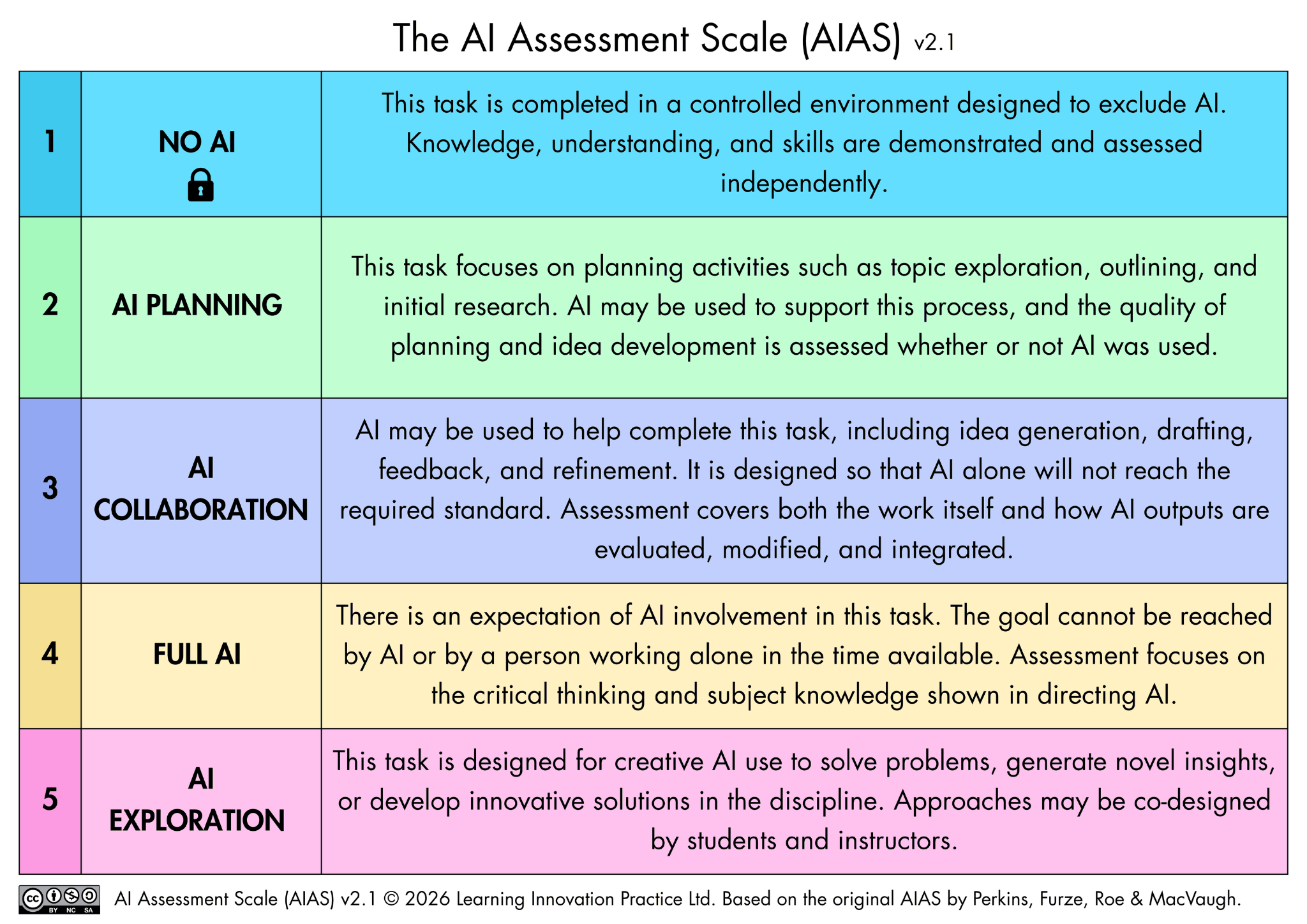
The AI Assessment Scale (AIAS), Version 2 (2024). Perkins, Furze, Roe & MacVaugh.
Perkins, M., Furze, L., Roe, J., & MacVaugh, J. (2024). The Artificial Intelligence Assessment Scale (AIAS): A framework for ethical integration of
generative AI in educational assessment. Journal of University Teaching and Learning Practice, 21(6), 49–66. doi.org/10.53761/q3azde36
Perkins, M., Roe, J., & Furze, L. (2024). The AI Assessment Scale revisited: A framework for educational assessment (Version 2).
arxiv.org/abs/2412.09029 · aiassessmentscale.com
Using AI to Enhance Your Teaching
While much discussion of AI focuses on student use, there are important ways AI can assist in course design and instruction. Repetitive tasks like generating exam questions, aligning rubrics, or formatting learning management system content can be streamlined using AI. However, human oversight remains essential to all assessment practices.
Core Principles for Instructor AI Use
- Assessment must remain human-centered, with instructors making all final evaluative decisions. AI grading can introduce inconsistencies and bias, research shows small changes in prompt wording can lead to drastically variable results, and the impersonal nature of AI-created feedback may hinder authentic relationships with students.
- GenAI should not be used for summative assessment due to risks like bias, lack of transparency, and unresolved ethical concerns.
- Protect student privacy and intellectual property by using only approved, secure AI tools in accordance with institutional guidelines. Do not submit student original work to GenAI tools without permission, especially tools that have not undergone privacy impact assessment.
- Students must be informed and given the option to opt out of AI-assisted assessment.
- Review all AI-generated content for accuracy, appropriateness, bias, and other possible harms before sharing with students.
- Be transparent about AI use, clarify for students which materials are wholly or partly generated by AI and clearly cite the source of those materials.
Practical Applications for Instructors
- Designing Courses and Learning Materials
- Create lesson plans, course outlines, and syllabi
- Generate multiple-choice questions, practice problems, and case studies
- Create rubrics and grading criteria
- Draft concept examples and real-world scenarios
- Brainstorm active learning strategies and new teaching ideas
- Write clear instructions for students
- Administrative Tasks
- Draft informative emails to students
- Draft letters of recommendation
- Assessment Support
- Draft assessments
- Provide draft feedback aligned with rubrics
- Suggest improvements for clarity and coherence in student submissions
Supporting Students in Using AI Responsibly
How AI Can Support Student Learning
Students are already using AI to find references, brainstorm project ideas, summarize readings, edit their writing, and prepare for tests. When guided properly, AI tools can:
- Serve as a coach or tutor by asking clarifying questions or providing examples
- Support the early stages of brainstorming an assignment
- Help students improve their writing
- Generate practice problems
- Suggest effective study strategies and time management techniques
- Help students develop critical thinking skills as they evaluate AI output
- Develop AI literacy expected in their chosen careers
Legitimate Student Uses of AI
Students can use GenAI tools to enhance their learning experience while doing substantive work themselves grounded in disciplinary and course-specific topics. Examples include:
Ideation and Brainstorming
Generate initial ideas for research topics and questions that students then refine and build on themselves. AI can help students move from broad ideas to more specific questions that they then refine according to disciplinary context.
Initial Research
Use AI platforms to do basic research to obtain an overview of a topic and help focus later work based on concepts and keywords learned. Students can input research questions to find sources and key terms to explore.
Improving Grammar and Writing
Students can input parts of their writing to receive feedback on common grammatical errors and tone. AI can not only edit writing but explain what it changed and why, which can be a useful learning tool.
When students use AI in these ways, consider requiring them to submit screenshots of AI outputs and describe how they built on that content.